Playlists — the heart of masqueradarr
A playlist is an envelope; its channels live separately. Understand that split — and the two channel stores behind it — and everything else about the catalog falls into place.
The row, and the channels inside it
A Playlist is a row in the playlists collection — the envelope: name, hosted URL, endpoint mode, schedule, and state. Its channels live separately in playlistchannels, queried by the playlist's source (or clone) id. A playlist row with no channels is a valid, paused shell.
playlists row
Name · HOSTED AT url · endpoint mode (global/custom) · schedule (interval + auto) · state. It carries no channels itself.
playlistchannels
The channel rows — name, number, logo, guide link, live status — keyed to the playlist's source id. This is what the detail view and the published M3U are built from.
Because the envelope and the channels are separate documents, a playlist can exist with zero channels (a paused shell provisioned but not yet synced), and the same channel store can be re-projected on every sync without touching the envelope's settings, schedule, or per-user grants.
A pristine reference, projected into an editable copy
Every playlist is backed by two channel collections — both with a deterministic _id = "<source>:<id>", both empty until the first Sync now.
sourcechannels
The normalized, pristine reference written only by a sync — the source of truth. Not surfaced to the UI.
playlistchannels
The editable store, 1:1 with the runtime channel, built from sourcechannels at sync time via toPlaylistChannel. Channel/playlist routes return these docs verbatim.
When you rename a channel, change its number, disable it, or set its guide link, you're editing playlistchannels. A re-sync merges: it $sets source-derived fields (so upstream changes flow through), $setOnInserts the user-editable fields (so your edits are never overwritten), and prunes channels that vanished upstream. Reset is the escape hatch — it drops the channels and re-syncs from scratch, discarding local edits.
Fields the source has no equivalent for (channel #, tvg_id, epg, stream.res) are stored as explicit null — never invented. Top-level status is the Active/Disabled governor; a Disabled channel is dropped from the published playlist without being deleted.
Three further fields on a playlistchannels row — failoverGroupId, failoverRole, failoverOrder — are operator-owned: no sync ever writes them, so a channel's failover grouping survives a re-sync alongside your other edits. That's the Playlist Failover story.
Provision → sync → normalize → project → play
The full lifecycle of a built-in source, from an empty shell to a channel you can stream. Nothing is written at boot — the pipeline only runs when you provision and sync.
ensureShellRow creates a zero-channel Playlist doc. Nothing is fetched yet.syncLive → adapter.listChannels() pulls the provider's current channel list.SourceChannel docs in sourcechannels — the normalized source of truth. afterSync() also writes epgsources / epgchannels / programs — self-EPG sources onlySourceChannel becomes a PlaylistChannel in playlistchannels. user edits preserved via $setOnInsertplaylistchannels verbatim; the channels appear in the detail view, Dashboard counts, and Channel Mapping.streamGate → proxyRelay → masq-proxy (Rust); the resolve seam calls resolveStream to fetch · rewrite · pipe. LIVE — HLS + raw-TSBuilt-in defaults, and bring-your-own
A playlist with its source set is a (Default) source playlist (id === source). Everything else is a custom playlist you compose yourself. All the type tags and modes are stored lowercase.
| Kind | source tag | Created via | Channels |
|---|---|---|---|
| (Default) source | <dynamic> | Add Playlist → Built-In | Synced from the adapter; id === source |
| Clone | clone | Add Playlist → Clone | Independent copies in playlistchannels; origin = the provider source for routing |
| URL import | url | Add Playlist → URL | Parsed from the upstream; re-syncable via the stored remoteUrl |
| File upload | file | Add Playlist → File | Parsed once from the uploaded .m3u |
| HDHomeRun | hdhomerun | Add Playlist → HDHomeRun | Discovered from a LAN tuner; playback via local origin — the bare TS socket is segmented in-engine, no remux |
A clone's channels are independent copies keyed to the clone, so editing them never disturbs the originals — but each remembers its origin provider, so a play still resolves through the right adapter's resolver. Streaming is always resolve-on-demand: the stream URL /api/v1/<source>/<enc-entry> is derived, never stored.
Category groups, bulk edits, and deletes that stick
A category group is the folder a channel is filed under in the playlist — the group-title your IPTV player shows in its category list. A failover group is a channel plus one or more silent backups that take over if it stops working. They are unrelated, and the next section is about the other one.
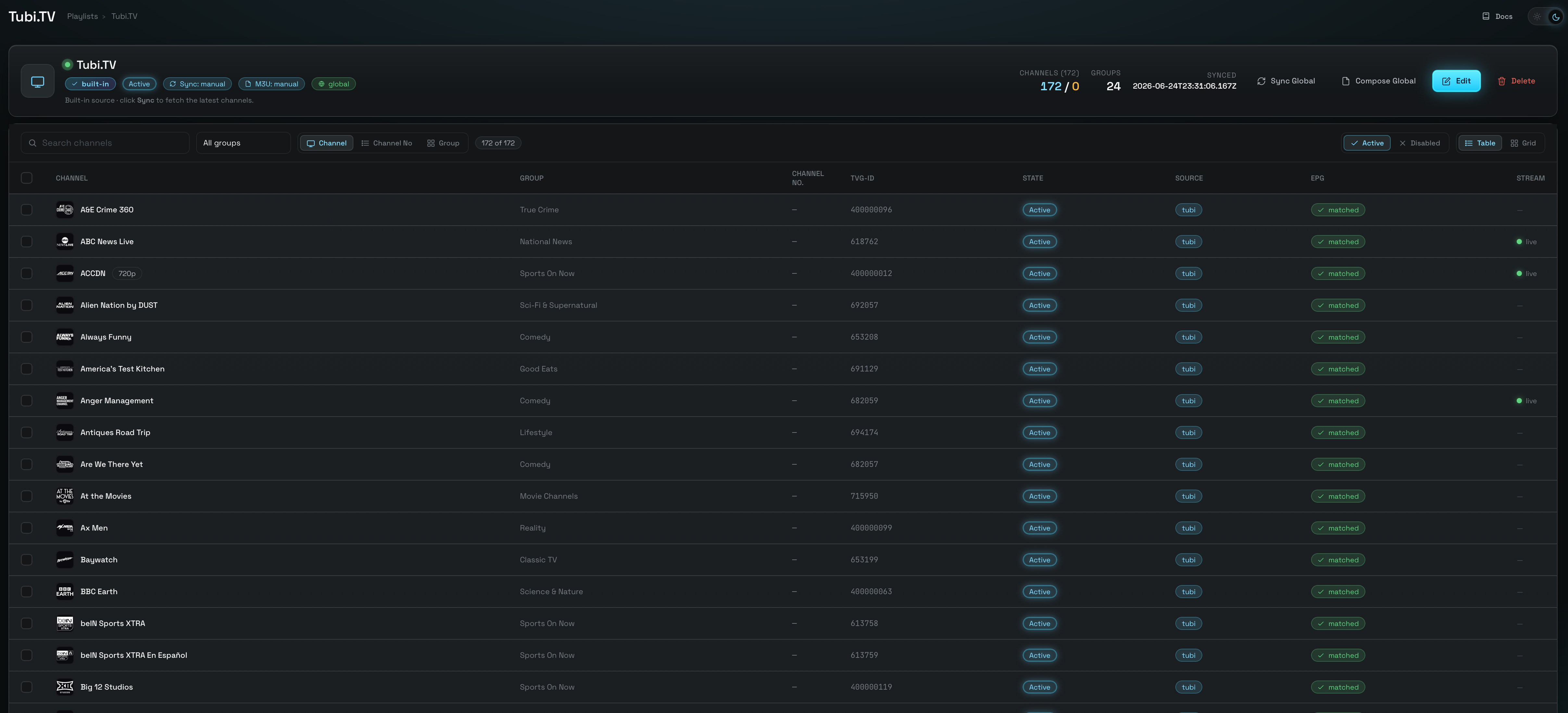
Open a playlist and you land on its channel table: one row per channel, sortable by name, number or group, narrowed by the group dropdown, the search box, and a segmented All / Matched / Unmatched guide-match filter. That filter is a view only — it changes what you see, not the channels — and Unmatched also includes channels that have never been evaluated for a match.
Check one or more rows and a selection toolbar appears — an {n} selected pill, then Group, Create / Append, Edit and Clear. The header checkbox toggles everything in view; Ctrl/Cmd + Shift on a second row selects the whole range between it and your last click.
First-class, and they survive a sync
A group is a real persisted object, not a label that exists because some channel happens to use it. That means you can create an empty group up front and file channels into it later — the next sync won't wipe the folder out, and the playlist header's Groups count includes empty ones.
The Manage groups panel appears in both the single-channel drawer and the bulk editor, sharing one registry. Each row shows a live member count and offers Rename (relabels every channel at once), Delete group (removes the folder, keeps the channels) and Add an empty group.
Change many at once, safely
Set status, Assign to a group, Remove EPG match, Tags and — on DaddyLive channels — Player source, then Apply to N channels.
Mixed selections say so rather than flattening the difference: a mixed status reads “mixed — leave unchanged”, and the tag chips are tri-state — solid on every selected channel, dashed on some, plain on none, cycling add-to-all → remove-from-all → leave.
Deleting a channel, singly or in bulk, does not just remove it: its identity is remembered, so a later Sync will not bring it back even though it is still there upstream. That is what makes a delete stick.
The only undo is the playlist's Restore Defaults (also labelled Reset), which forgets every tombstone — and discards every edit you have made, re-fetching from scratch. It is a clean slate, not a gentle un-delete.
Three actions that are easy to confuse: Disabled hides a channel from the published playlist but keeps it and survives every sync, fully reversible. Delete removes and tombstones it. Restore Defaults is the nuclear reset.
The published playlist lists categories alphabetically. The order groups appear in the Manage panel is for your convenience while you work — it does not change the order players show them in.
A channel can have backups
Any playlist's channels can be gathered into a failover group: one parent plus an ordered line of children — silent backups for the same real-world channel, often from entirely different providers. Select the channels on the playlist detail screen, hit Group, pick the parent, drag the rest into priority order.
Only the parent is exported: the composed .m3u and its guide carry one line for the group, and the children inherit the parent's guide link. When the parent's stream won't start, the engine walks the children in order and serves the first one that answers — under the parent's URL and identity, so the viewer never notices.
A group lives inside a single playlist, and a built-in (Default) playlist only ever holds one provider's channels — so every backup you could pick there shares the upstream that just died. Clone the channels into a custom playlist, Append the equivalents from other providers, and build the group there. The full reasoning, the walkthrough, and the play-time mechanics are on the Playlist Failover page.
List view and detail view
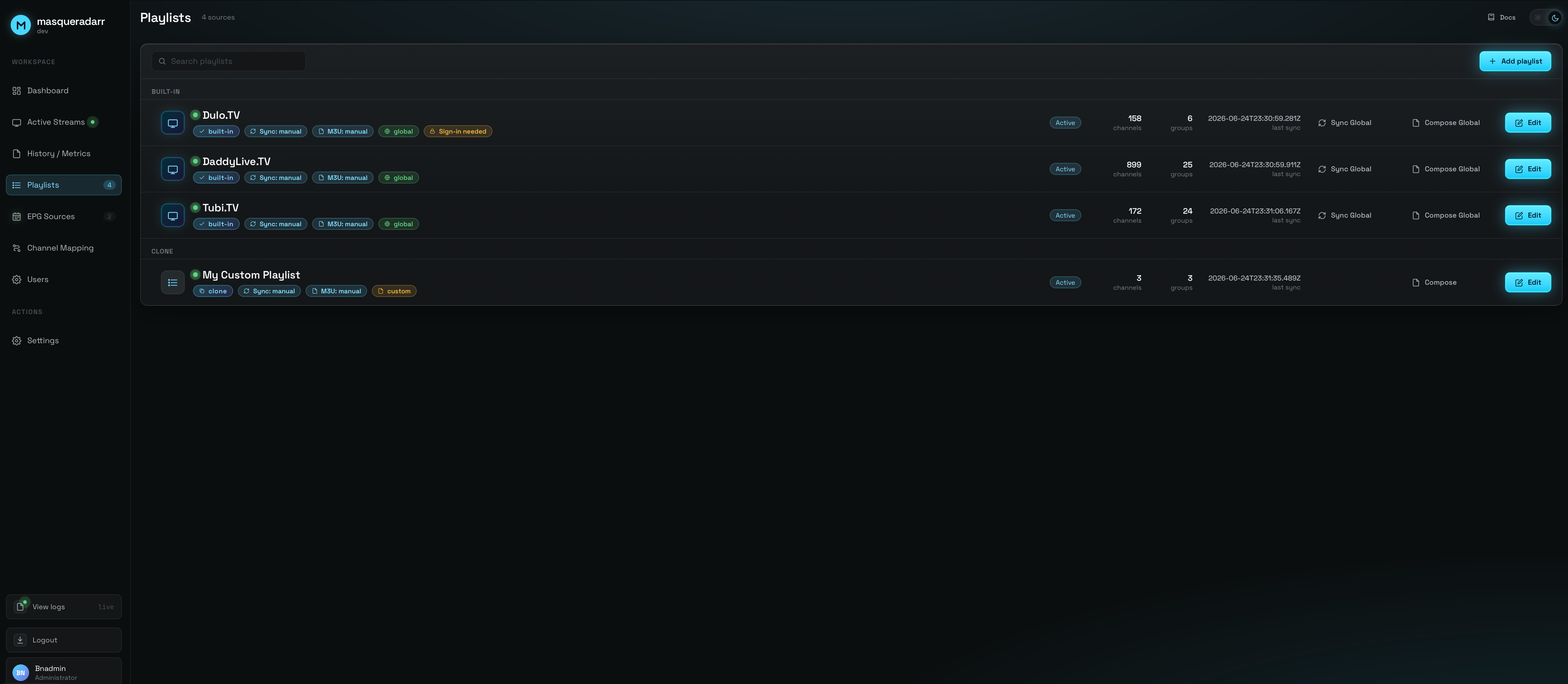
The list view shows every playlist as a row — name, source/type, status, channel count, schedule chips — built-in and custom side by side. The detail view is the channels inside one playlist, where you edit individual channels and run syncs.
Putting the list in your own order
Once you run more than a handful of playlists, the list itself needs organizing. Three controls do it, and they interact:
A PINNED section on top
Pinning lifts a playlist into its own section above the kind groups, in its own order. The ones you touch daily stop being buried under the ones you set up once.
Reorder within a section
Drag a row to place it. A playlist you have never dragged sorts last, so adding a new one never disturbs an order you have already built.
A toggle that yields
The toolbar's A–Z switch sorts alphabetically instead — and turns itself off the moment you drag a row, because the two intentions cannot both be honoured. Reordering also pauses while a search filter is active.
Global vs. Custom — where a playlist is served
The endpoint mode decides how a playlist is exposed. Built-in defaults are Global by default; the custom kinds are Custom.
The consolidated Global M3U
Served through the one Global M3U endpoint — a roll-up of every Active channel across all Global playlists, accessed as a single playlist.m3u.
Its own path + guide sibling
Served at its own path, riding the per-playlist export machinery — a dedicated .m3u with a matching XMLTV guide sibling.
- The URL always prepends
settings.domain. Change the Domain in Settings and it cascades — every playlist'surl("HOSTED AT") is rewritten automatically. - State pauses the endpoint.
state:falsemakes downstream clients get a 404, without deleting anything. - Schedule drives refresh.
interval+autohand the playlist to the scheduler; a manual Sync now is always available.
Two mechanisms — keep them separate
Guide data reaches a playlist two distinct ways. (The full EPG story — providers, the shared sync path, the compose pipeline — is the EPG & guide data page.)
Channel-level linking
EPG attaches through a playlist's channels, not the row. Each channel carries a 2-factor (tvg_id, epg) link — set on the Channel Mapping screen (or self-linked by sources that ship their own guide). At compose time the guide is built from exactly the channels that carry a link, so many sources can feed one playlist's guide.
Playlist-bound (playlistBinding)
Some built-ins carry their own inline guide. Syncing such a playlist runs its afterSync hook, which writes the guide and upserts an EPG source flagged playlistBinding:true, then self-links the channels. The playlist drives their refresh, so the EPG Sources screen hides their sync/schedule controls — you never add or schedule them by hand.
Who can use which playlist
Access is a per-user allow-list, split to mirror the endpoint modes: allowedPlaylists (Global-endpoint) and allowedCustomPlaylists (Custom-endpoint). You assign membership on the Playlists screen, per playlist — not by editing the user. (Full auth & token detail is on the Users & access page.)
- Admins ⇒ every playlist. An admin's allow-lists are materialized to hold every playlist id, and a new playlist auto-grants to all admins — so an admin always sees the full catalog.
- Each user gets a tokenized URL. A personal
.m3u+ XMLTV guide link whose download is token-free but whose stream is token-gated to that user's allowed playlists. - Granting is what makes an account work. A standard user with nothing granted sees an empty Dashboard, gets a channel-less M3U, and can't stream.